The 5 Best Google Analytics Alternatives In 2026 (We have used them all)

Google analytics has to be one of the most poorly crafted software products known to humankind. Nobody really likes it, the UX is terrible, poor privacy for users and yet everyone seems to feel that they are forced to use it.
At least, this use to be the case. In 2026 there are a host of options and, luckily for you, the team and I have used all of them for over a year. In this article we will share these experiences with you so that you can avoid the pain.
TL;DR:
For those of you who just want the quick rundown of my experiences, use Splitsense for most things and Posthog if you have a data heavy business, all else fails Plausible is a great backup.
What Acutely Equates To A Good Google Analytics Alternative?
As mentioned above, there are a lot of issues with google's current analytics offering. The two main issues that both myself and the wider community have are as follows:
- Lack of privacy - This is a huge issue with google as they track everything your users do on your website as well as what you do. For GDPR in europe this is a nightmare that many companies face, without many solutions to help get around it.
- The UX is poor - G4A is a very convoluted, bloated and confusing experience with simple tasks feeling like a degree is required to understand how to perform them.
G4A also lacks a lot of useful nice to haves such as Heatmaps, Session replays, AI functionality, Funnels just to name a few, all of which are crucial for improving a product/website.
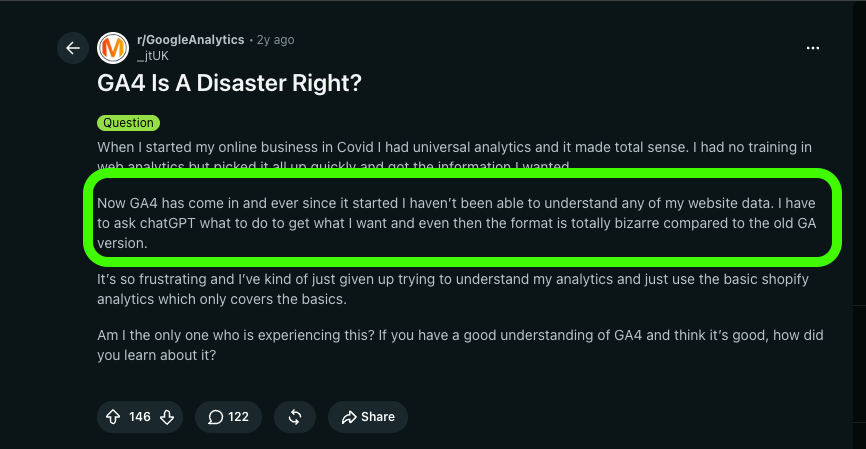
My personal issues with it is that everything is event based and I have to set everything up myself. Now, I understand the concept and the idea behind it but in reality it is time consuming, difficult and leaves you open to a lot of sync issues.
Now with all of my complaining in mind, here is how I analysed the alternatives and what myself and my two co founders ranked them against.
- Privacy - Does it provide privacy or use cookies? If not, great!
- Features - Are the feature sets on offer useful beyond just looking at what is going on. I want to gain an understanding of what my users are doing, not just where they came from.
- UX - How easy is it to get started and navigate around the app and can I actually understand what I see?
These issues acutely highlight why the team and I built Splitsense. There simply wasn't a great amount of options available to us.
My first flurry came in 2021 when I decided to give my first web analytics tool a run out on my new(at the time) website called Devremote. That tool was called Plausable.
#1 Plausible Analytics, the Simple But Effective
I have a great feeling towards plausible, I always will, it was my go to analytics tool of choice for almost 5 years. It saw me through making my first internet dollar, my first refund and my first complaint. It was a tried and tested companion, with good reason.
Its blissfully simple and the complete oposit to Google analytics's complex UI that I feel in love with it the second I began using it.
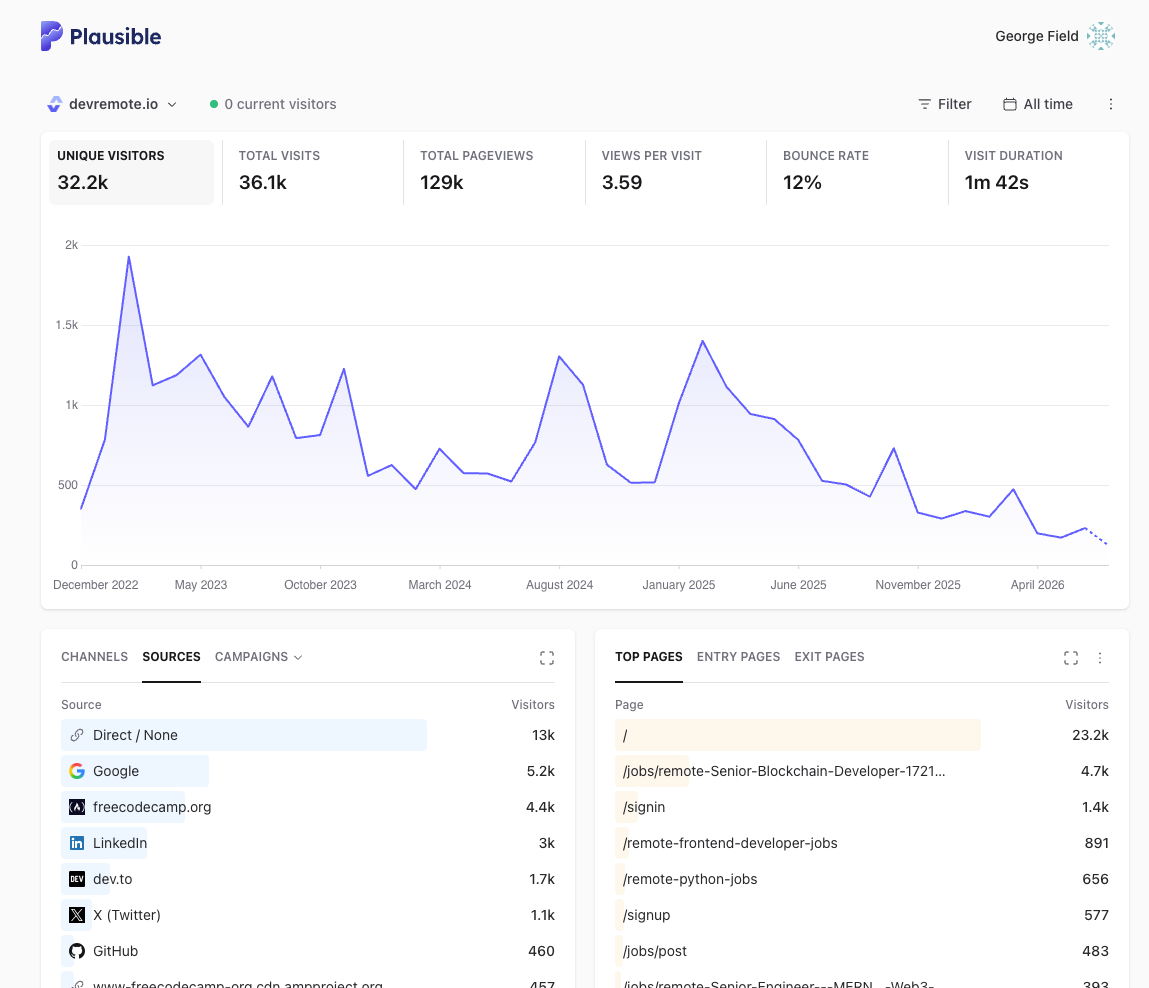
It felt mystical at the time, simply sign up, pay, install and there, in a very simple to understand user interface is all the analytics that you want to see almost everyday.
A well thought out product was finally in my grasp. It had everything I needed, lightweight, fast script loading times on my website, cheap, honestly a great option.
The issue With Plausible (And why I left)
Plausible is very good at telling you the basics in a very simple, clean manor. I loved it for that but there comes a point where you outgrow a solution. For all of its simplicity, it lacks the more complex features such as session replays, heat maps, good funnels (it does have them but again, requires you to go and fiddle with events) and AI features that I have just found so useful and time saving.
Its a common theme with plausable, in thier deffence you could argue that it was built to be flexible, which is good but most of us need the same tooling in a clean and simple way, for example one reddit user was getting a high, 61%, bounce rate but couldn't figure out why.
Plausible showed 61% bounce rate but couldn't tell me WHY, so I added custom events to actually understand user behavior
by u/pocketrob in VibeCodersNest
Reddit user with high bounce rate
Now while its awesome that this user was able to do this, they shouldn't have too.
It Gets Expensive Quick
Another problem is that plausible can get expensive quickly when you move beyond basic use.
| Plan | Price (monthly) | Best For | Key Features |
|---|---|---|---|
| Starter | $9/mo | Solo founders | 1 website, goals & events, email reports, 3 years of data retention |
| Growth | $14/mo | Small teams | Everything in Starter + up to 3 sites, team members, shared dashboards |
| Business | $19/mo | Growing SaaS | Everything in Growth + funnels, user journeys, revenue tracking, Stats API, custom properties |
| Enterprise | Custom | Large businesses | SSO, Sites API, managed proxy, raw event exports and custom limits |
That table shows just the starting price. You pay per 10,000 events after you hit your limit (very easy to do so). When you want to do more activities that will help you improve your website, this cost mounts up fast.
I'd recommend plausible to anyone who just wants a simple platform to see where your users are coming from, if you want to understand what they do, who they are and how you can improve your website then I'd say there are better options out there. Better options that we will now discuss.
| Pros | Cons |
|---|---|
| Extremely simple and intuitive interface | Limited user behaviour insights |
| Quick to set up and easy to maintain | No built-in session replays |
| Lightweight script with excellent performance | No heatmaps |
| Privacy-focused and GDPR-friendly | Funnel analysis is fairly basic |
| Affordable pricing | Advanced event tracking requires manual setup |
| Clean dashboard that's easy to check daily | Limited AI-powered insights and automation |
| Great for traffic sources, page views and referrals | Harder to diagnose why users aren't converting |
| Open source and transparent | Can be outgrown as your product becomes more sophisticated |
Honestly, there is a reason I stayed with plausible for so long, its a quality product, open source and a great option for a lot of marketers, developers and business owners. Eventually though, I just worked with my two co-founders to build the ultimate alternative to Google Analytics.
#2 Splitsense, The Gift That Keeps Giving
Of course there is a slight, only slight, bias here but we do think we have built the ultimate alternative to Google Analytics here. As mentioned above, one of the reasons I moved Devremote off of plausible was because it needed more than just analytics, it needed a tool to help understand what users were doing, and, just like the user in the reddit post we mentioned above, we needed to understand why users were behaving the way they were and, most importantly, what we could do about it.
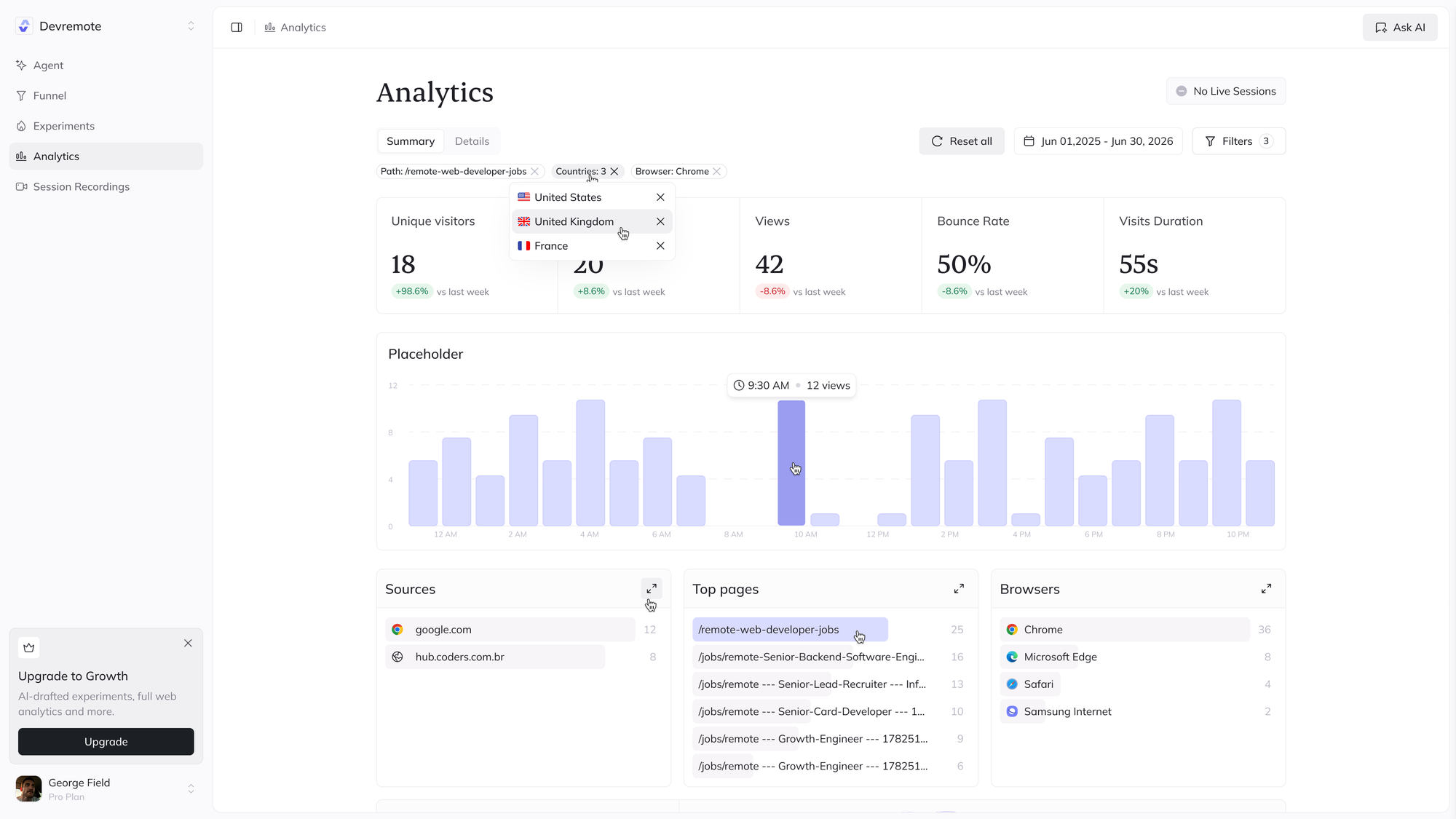
The result is that Splitsense offers private, cookie free web analytics platform, session replays, funnels, heatmaps, automated A/B testing, a full set of AI Agentic functionality for a set price per month. It comes with integrations too, allowing you to connect Google Analytics and let Splitsense make sense of your data.
No Open Source, But it's worth the trade off
Although Splitsense does not have an open source offering, its more than made up for with its large feature set, beautiful data visualisations, reporting and productivity centric methods for providing you with the correct data when you need it.
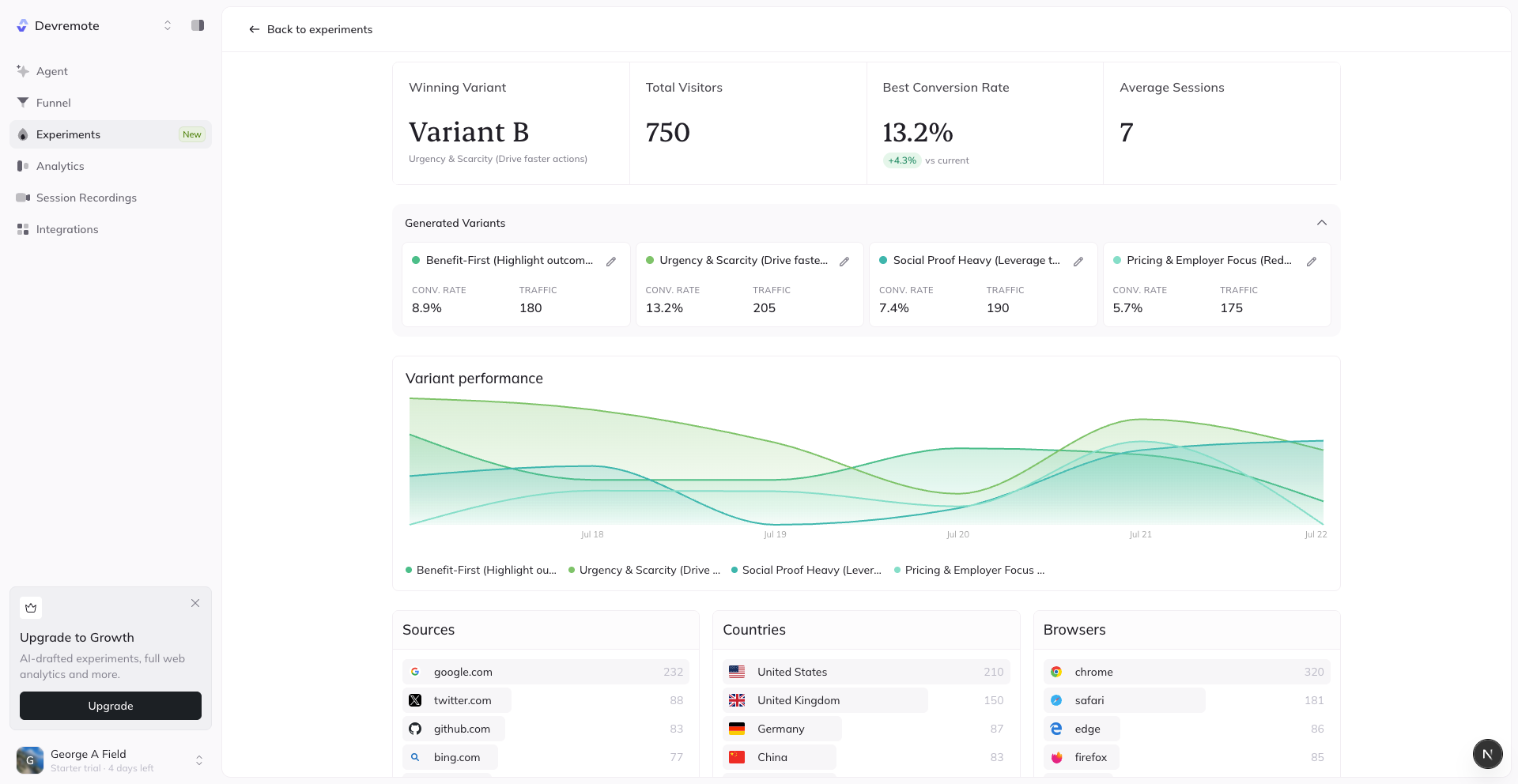
It is an absolute weapon to have in your arsenal and a powerful tool for helping you take action that will lead to improved experiences for your users and more revenue for you. Without Splitsense, you would need to purchase other conversion optimisation tools, adding to costs to operate your website or business.
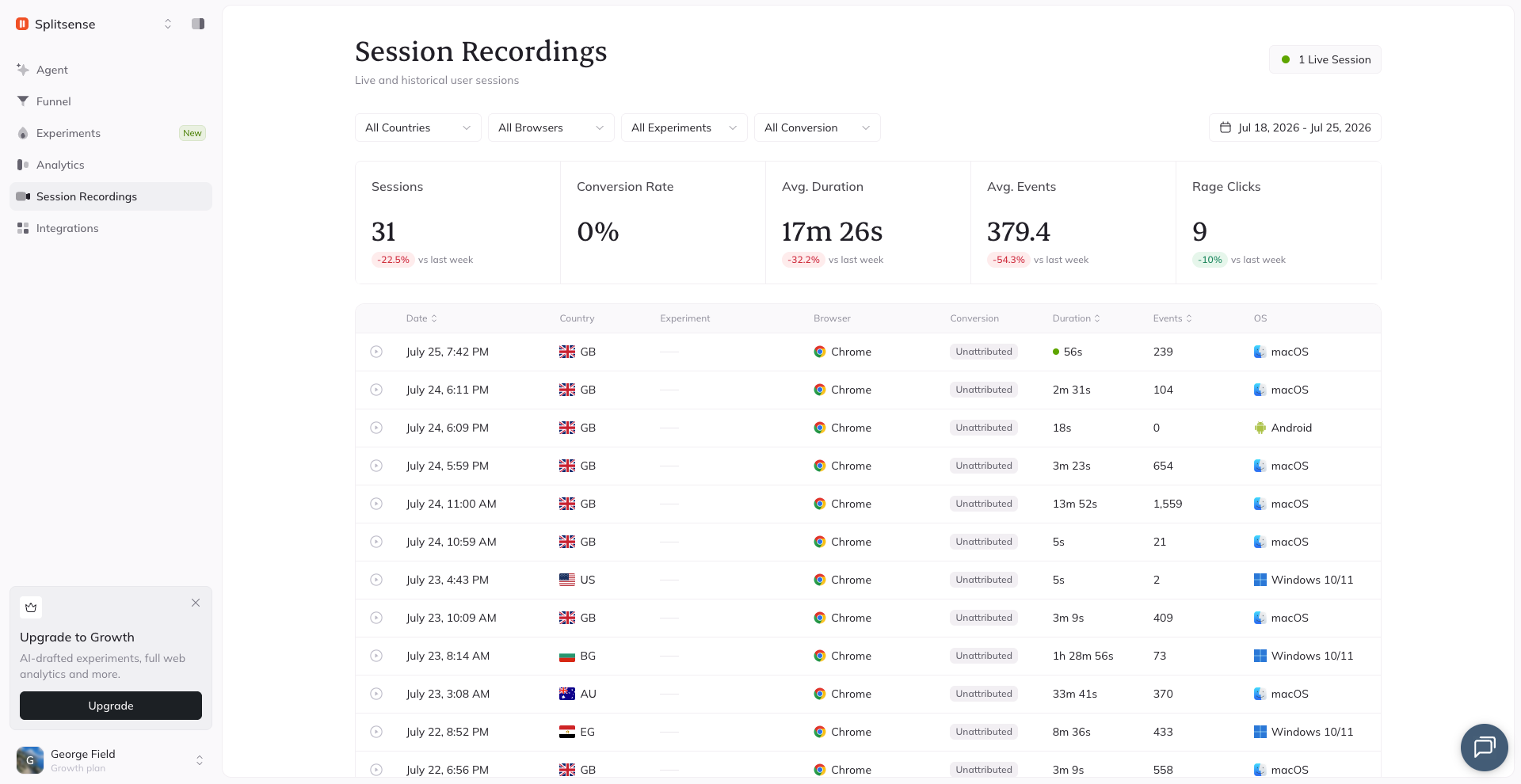
Did you say AI Agent?
The biggest thing that I love about Splitsense though is the agent feature. It is a fully autonomus CRO, UX and reporting agent that works for you while you sleep, analysing pattens, testing different ideas and proving you with reports on improvements. You can of course manage it and have control over it if you wish but honestly, this is a feature that nothing else on this list possess and it alone is worth the subscription price.
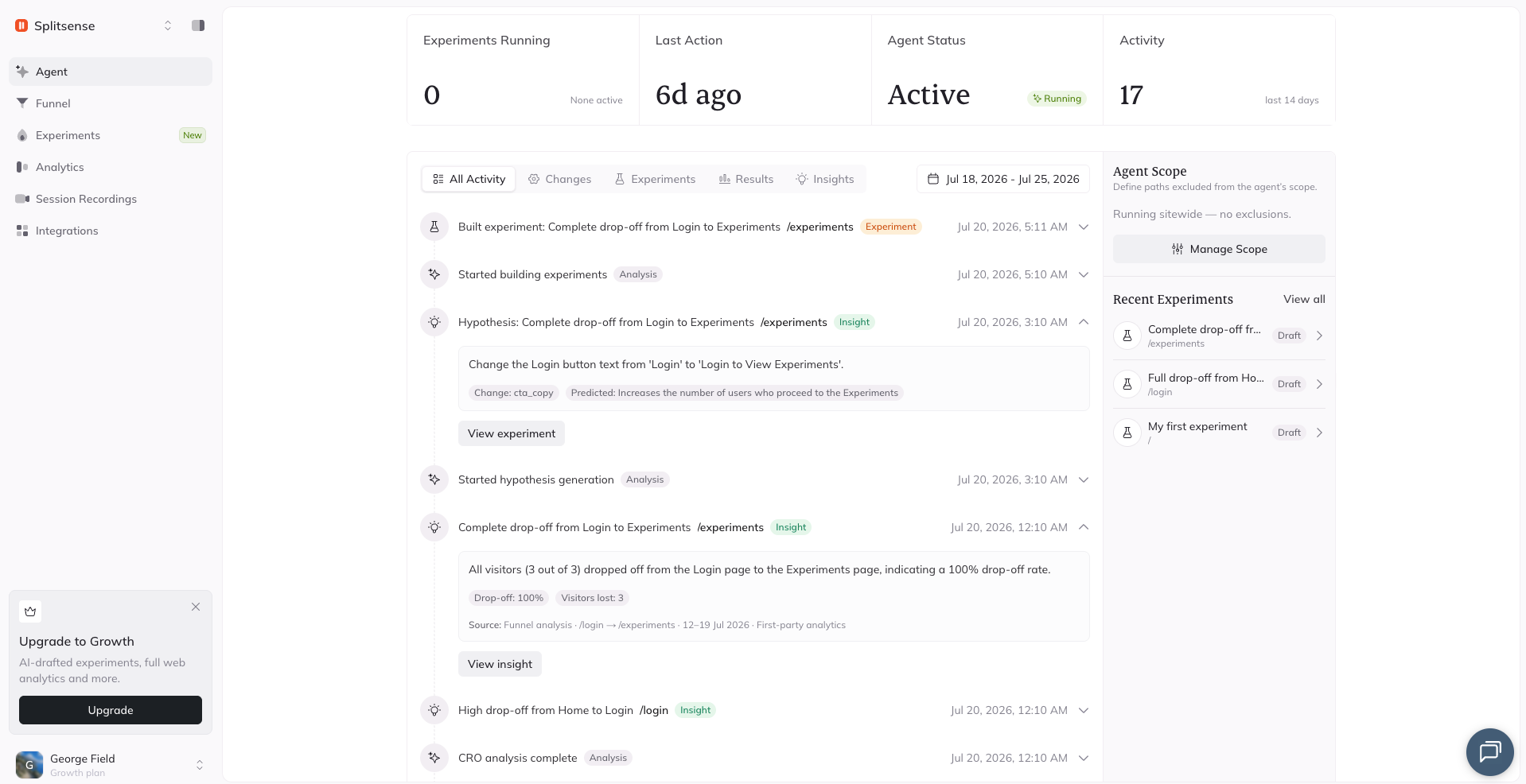
While the starting price of $19 a month for Splitsesne is higher than Plausible, and some of the other options on this list, it is a fair price for the amount of value you get.
| Pros | Cons |
|---|---|
| All-in-one platform (analytics, session replays, heatmaps, funnels and A/B testing) | Higher starting price than basic analytics tools |
| AI agents proactively identify issues and suggest improvements | More features means a slightly steeper learning curve |
| Cookie-free, privacy-first analytics | Not open source |
| Automated A/B testing reduces manual optimisation | May be more than smaller websites need |
| Integrates with Google Analytics to enhance existing data | Best value is unlocked when using multiple features together |
| Modern, easy-to-understand dashboards and reports | Newer product with a smaller community than established competitors |
| Eliminates the need for multiple separate CRO tools | Fewer third-party integrations than some enterprise platforms |
| Focused on improving conversions, not just reporting traffic | Enterprise-level customisation is still evolving |
You are getting far more than just web analytics, you are getting a fully fledge product with its entire purpose to help you understand your website, improve and optimise it.
| Feature | Starter | Pro | Growth | Enterprise |
|---|---|---|---|---|
| Price | $19/mo | $39/mo | $79/mo | Custom |
| Website Analytics | ✅ | ✅ | ✅ | ✅ |
| Session Replays | ✅ | ✅ | ✅ | ✅ |
| Funnels | ✅ | ✅ | ✅ | ✅ |
| Reports & Dashboards | ✅ | ✅ | ✅ | ✅ |
| Custom Events | ✅ | ✅ | ✅ | ✅ |
| Heatmaps | ✅ | ✅ | ✅ | ✅ |
| Team Members | 1 | 5 | 20 | Unlimited |
| Monthly Sessions | 10k | 100k | 500k | Unlimited |
| Replay Storage | 30 Days | 90 Days | 180 Days | Unlimited |
| AI Insights | — | ✅ | ✅ | ✅ |
| AI Session Summaries | — | ✅ | ✅ | ✅ |
| AI Funnel Analysis | — | ✅ | ✅ | ✅ |
| AI UX Recommendations | — | ✅ | ✅ | ✅ |
| AI Experiment Suggestions | — | ✅ | ✅ | ✅ |
| A/B Testing | Basic | Advanced | Advanced | Enterprise |
| AI Agents | — | — | ✅ | ✅ |
| Autonomous CRO Agent | — | — | ✅ | ✅ |
| AI Website Audits | — | — | ✅ | ✅ |
| AI Journey Analysis | — | — | ✅ | ✅ |
| Advanced Integrations | — | Basic | ✅ | ✅ |
| API Access | — | ✅ | ✅ | ✅ |
| Webhooks | — | ✅ | ✅ | ✅ |
| Custom Integrations | — | — | Optional | ✅ |
| SSO / SAML | — | — | — | ✅ |
| Audit Logs | — | — | — | ✅ |
| Priority Support | — | ✅ | ✅ | Dedicated |
| Dedicated Success Manager | — | — | — | ✅ |
| SLA | — | — | — | ✅ |
The closet, next best of course, option to Splitsense is Posthog. I suppose we better, reluctantly, include them as they are not the worst option that you could choose.
Get started For Free, No Credit Card Required.
#3 Posthog, I Suppose They're Not Too Bad
I first used Posthog when working for a VC funded startup and, to be fair, I did love it. It is undeniably a great product but my one key issue with it, is that its geared towards developers.
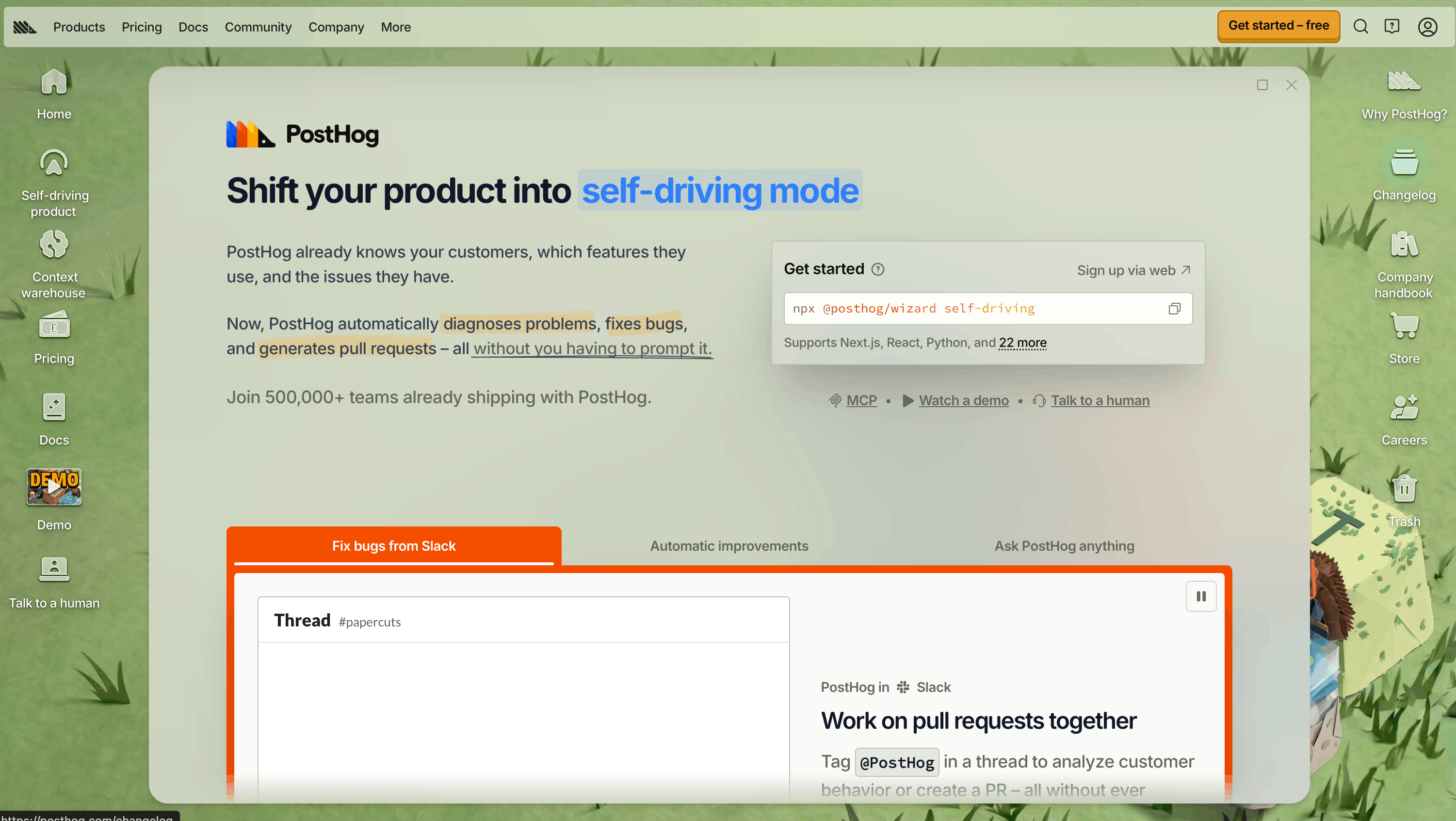
Depending on who you are and what you are looking for Posthogs offering might be perfect for you. Like Splitsense, it offers A/B testing (NOT Automated with AI though), it offers feature flags too, which is a nice touch but its main focus is on tooling for developers.
It features web analytics, session replays, AI Github integration with pull requests, logs and a load of other useful features for developers.
As a software engineer myself, I value the AI observability pull request feature a lot and it is the standout premium tool that I think ads astronomical amounts of value. Why? Simple, I don't get woken up at 3am when something breaks. Well...In theory anyway!
Posthog will fix issues while you sleep and then create a PR for them. That is a powerful and useful feature. Still though, you are probably going to want to check the PR it created the next day to avoid any future headaches.
Developer focused, great for some
Its a great option with a very generous free tier. It is however a very developer focused platform, I know they are marketing to product engineers and that is fine, but for building products that grow, especially for smaller businesses, the focus should very much be on a partnership between marketing, optimisation and understanding your users, that is why we moved away from using it.
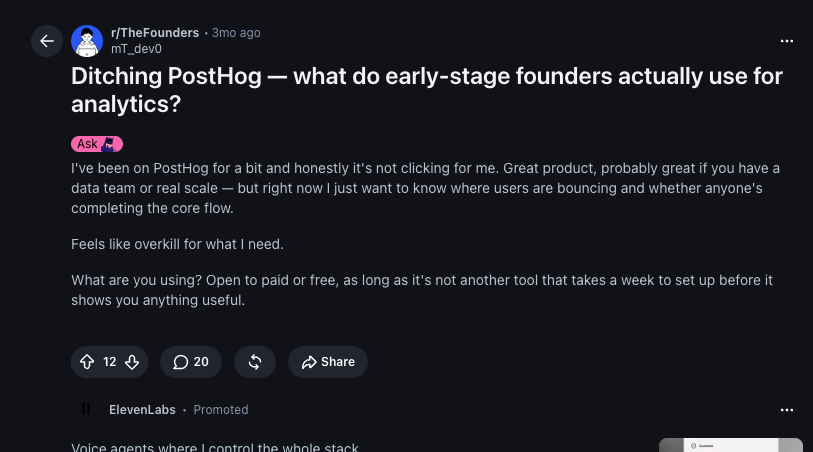
The issue with these large business, such as Posthog is that they often get caught in the trap. The organisation has multiple small teams, each all owning a feature but the issue with that is that, no matter how hard you try, details get lost in communication and in our opinion this has translated into their product.
| Pros | Cons |
|---|---|
| Excellent all-in-one product platform with analytics, session replays, feature flags, error tracking and more. | Can feel overwhelming due to the sheer number of features available. |
| Very generous free tier, making it accessible for startups and indie developers. | Primarily designed for developers and product engineers rather than marketers or CRO teams. |
| Powerful feature flags and experimentation capabilities for shipping features safely. | A/B testing is manual rather than AI-driven or automatically optimised. |
| AI-powered engineering tools, including automated bug fixing and pull request generation, can save significant developer time. | Many features are only valuable if you have an engineering team to use them effectively. |
| Open-source roots and self-hosting options appeal to teams wanting full control over their data. | Navigation can become confusing because many products are bundled into a single interface. |
| Strong event tracking and product analytics for understanding user behaviour. | UI prioritises functionality over simplicity, creating a steeper learning curve for non-technical users. |
| Integrates well into modern engineering workflows and CI/CD pipelines. | Teams looking for a marketing-first optimisation platform may find it overly technical. |
| Actively developed with frequent feature releases and a strong developer community. | As the platform has expanded, the product can feel less focused than specialised alternatives. |
| Suitable for larger startups, SaaS businesses and engineering-led organisations. | Smaller businesses may end up paying for or navigating features they'll never use. |
| Comprehensive platform that can replace several separate developer tools. | Collaboration between marketing, product and optimisation teams isn't as central to the product experience as it is in dedicated conversion optimisation platforms. |
The UI is simple but not clean and easy to digest with a focus on large enterprises, data teams and funded companies. We think its a great option if you are one of those but if you are not, well you will need to look elsewhere.
| Product | Free Allowance | Pricing After Free Tier | Notes |
|---|---|---|---|
| Product Analytics | 1 million events/month | $0.00005 per event | Includes funnels, retention, paths and product analytics. |
| Session Replay | 5,000 recordings/month | $0.005 per recording | One of the more expensive products as usage grows. |
| Feature Flags | 1 million requests/month | $0.0001 per request | Includes feature flags and experimentation. |
| Data Warehouse | 1 million rows/month | $0.000015 per row | For importing and analysing external data. |
| Error Tracking | Generous free tier | Usage-based | Pricing scales with exceptions processed. |
| Surveys | Generous free tier | Usage-based | Charged based on responses after the free allowance. |
| Enterprise | Custom | Contact Sales | Adds SSO, advanced security, compliance and dedicated support. |
#4 Unami, The Open Source Option
Unami is a great option for those who want to self host. Unlike plausible it provides you with all of its functionality for free and its open source so you can of course self host it.
I gave Unami a go myself back in 2024 but our partnership wasn't to flourish due to needing the more complex features that Splitsense offers. Aside from my personal issues with it, it is an excellent option for those who just want a simple, free, self hosting analytics platform and this is why I have included it on this list.
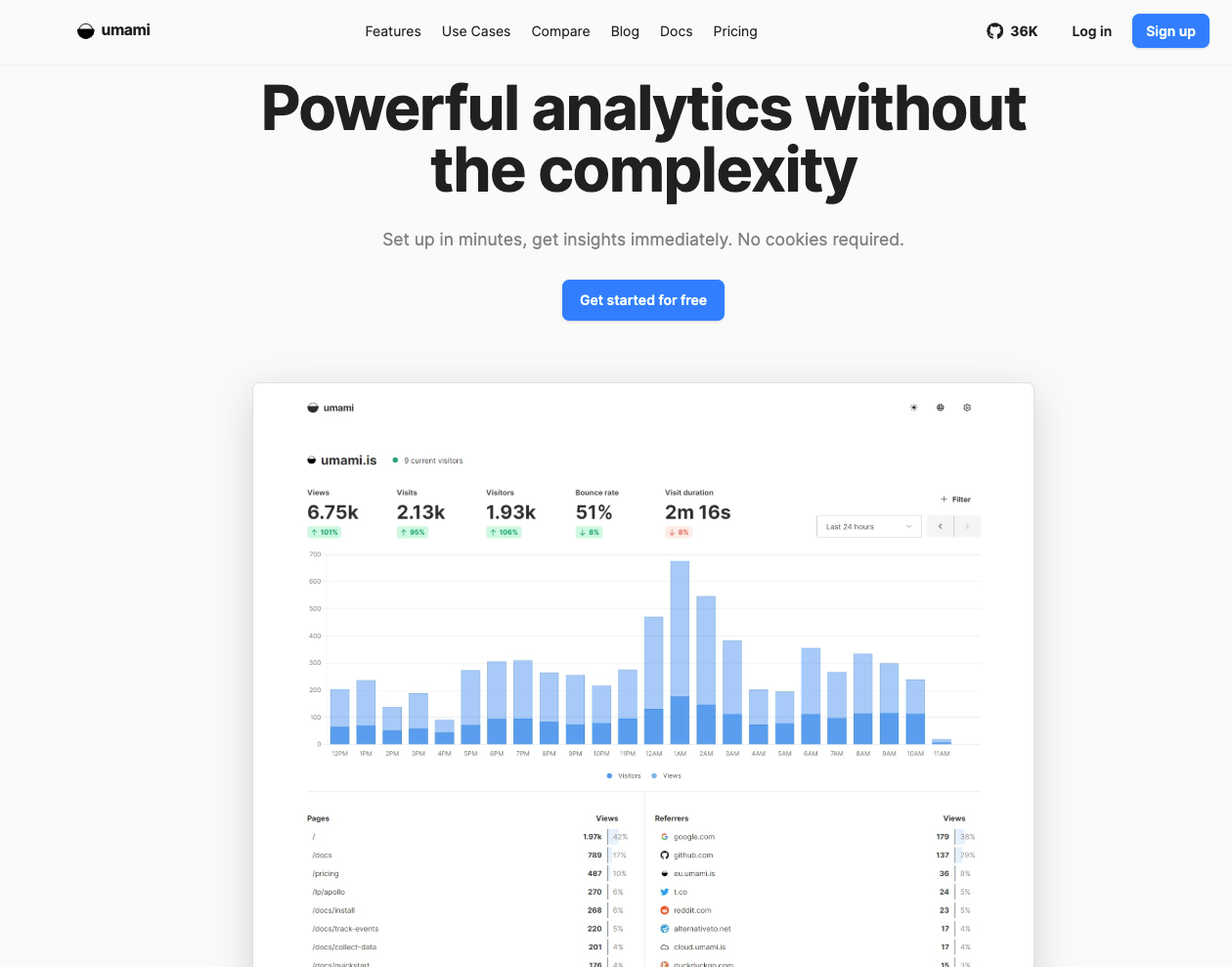
Just like Plausible it features a simple, clean dashboard that shows core analytics and metrics that most users care about. It's easy to digest and looks great in a reporting screenshot for managers.
Identical But Open Source
Unami's feature set is essentially identical to Plausible, hence why I didn't opt to use it long term. If you are going to self host Unami you can't go wrong. Simply use a $5 VM on hertzner and you have got yourself a full web analytics tool that costs slightly more than a cup of coffee each month. That sounds like winning to me!
Ignoring my terrible references to Charlie Sheen memes, Unami is the go to for self hosting. Here are my pros and cons for Unami:
| Pros | Cons |
|---|---|
| Completely free and open source, making it ideal for self-hosting. | Feature set is fairly limited compared to more comprehensive analytics platforms. |
| Self-hosting gives you full ownership and control over your data. | Lacks built-in A/B testing, experimentation and conversion optimisation tools. |
| Clean, lightweight interface that's easy to understand. | No session replays or heatmaps for understanding user behaviour. |
| Privacy-friendly analytics with no reliance on Google services. | Few advanced marketing or growth features beyond basic analytics. |
| Very low hosting costs – can comfortably run on an inexpensive VPS. | Requires you to manage hosting, updates, backups and maintenance yourself. |
| Excellent performance thanks to its lightweight architecture. | Self-hosting adds operational overhead compared to managed SaaS alternatives. |
| Simple to deploy with Docker and well documented. | Smaller ecosystem and fewer integrations than larger competitors like PostHog. |
| Great choice for developers who want full control over their analytics stack. | Less suitable for marketing teams looking for actionable optimisation insights. |
| Active open-source community with regular updates. | Limited collaboration and reporting features for larger organisations. |
| Ideal for personal projects, indie hackers and small websites. | Businesses that need funnels, session recordings or AI-powered insights will likely outgrow it. |
Unami's pricing should you choose to not self host is basically identical to Plausible.
| Plan | Price | Includes | Best For |
|---|---|---|---|
| Self-Hosted | Free | Full feature set, unlimited websites, unlimited users (subject to your own server resources) | Developers, hobby projects and businesses wanting complete control over their data. |
| Umami Cloud – Solo | From $9/month | Managed hosting, automatic updates, analytics dashboard and support | Individuals and small websites that don't want to manage a server. |
| Umami Cloud – Team | From $29/month | Increased usage limits, multiple team members and managed infrastructure | Small teams and growing businesses. |
| Enterprise | Custom | Dedicated infrastructure, higher limits, priority support and enterprise features | Large organisations with advanced requirements. |
Honestly, the time I spend using Unami was great. Its a loved product online and with good reason, people on reddit rave about it! This thread makes for great reading if you are interested in Unami or Plausible.
self-hosted analytics: comparing Umami, Plausible and Matomo
by u/Chronicallybored in selfhosted
#5 Visitors, Revenue Meets Analytics
I will say it as it is, Visitors is a cool product and the ultimate collaboration between web analytics, revenue and attribution. I mean, it's main dashboard page is a thing of beauty and a wounder to behold.
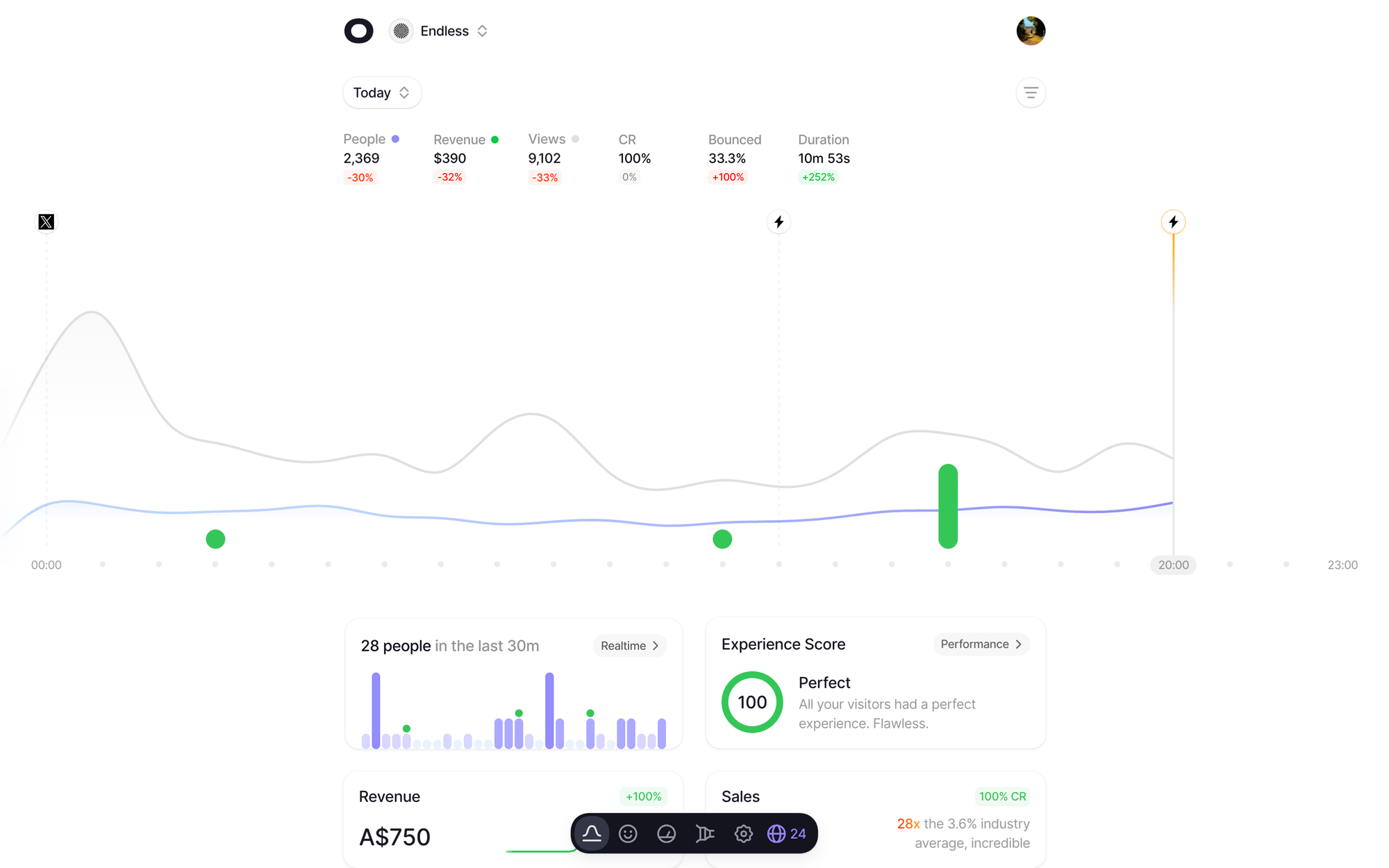
Visitors shines at showing you the correlation between visitors (hence the name) and revenue attribution. Its a great product for those who are struggling to understand what pattens are causing sales, or lack of sales.
Session Tracking A Gift From The Gods
One of its main features that I do love is the session tracking feature. This feature creates a fake persona of a user with an avatar and a name and then lets you clearly see the actions they have taken. Its very cool and a great tool to get insights into what users are doing.
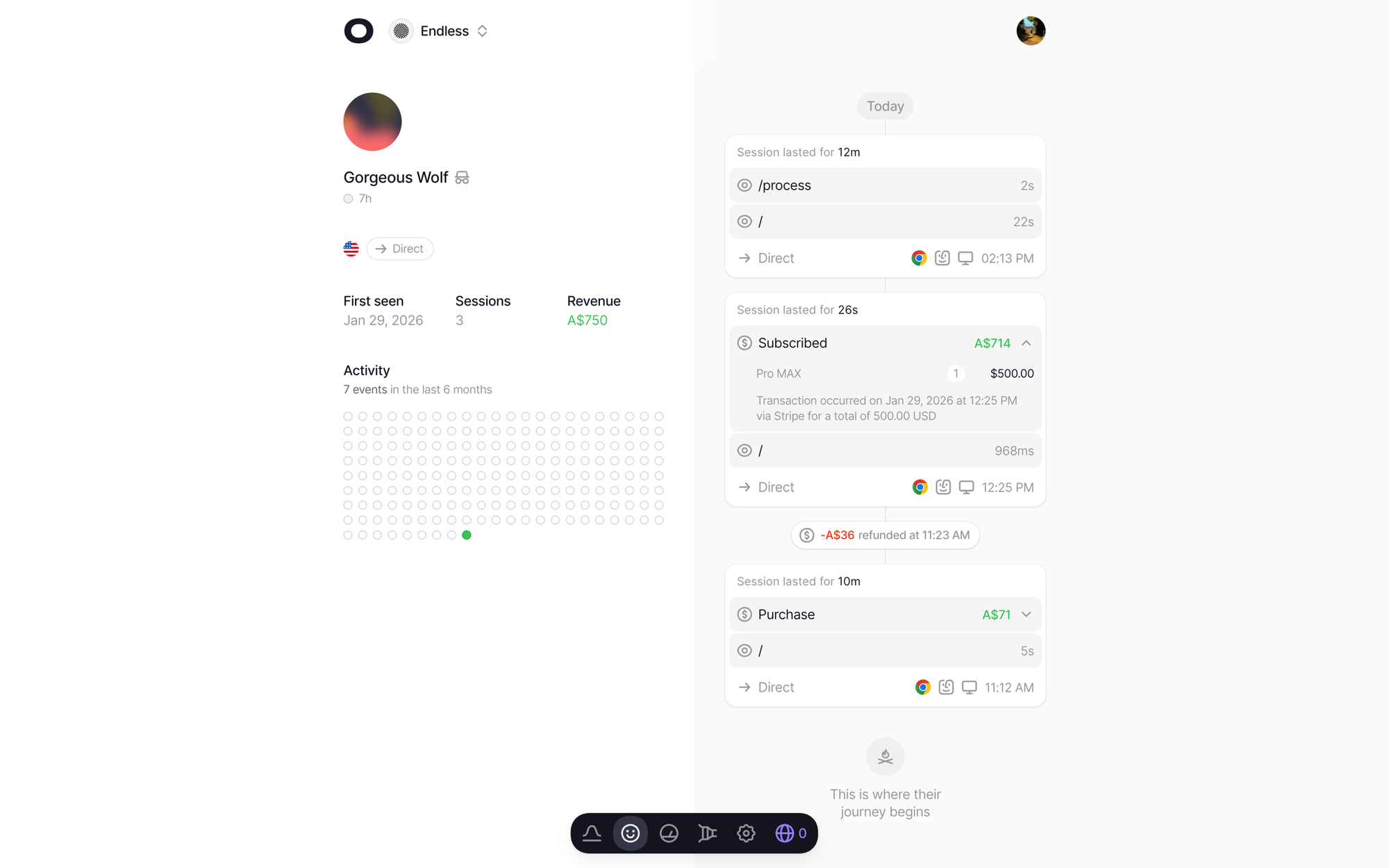
The only issue I have with Visitors is that, for all of its beauty, I find that it has a lot of emphasis on being beautiful over being useful. Its main dashboard page for example looks lovely but it takes a minuet just to understand the main chart.
| Pros | Cons |
|---|---|
| Excellent blend of web analytics, revenue attribution and customer insights. | Prioritises visual design over surfacing the most actionable insights. |
| Beautiful, modern interface that's one of the best-looking analytics dashboards available. | Some charts can take time to understand, slowing down analysis. |
| Strong revenue attribution features that help connect marketing efforts to sales. | Less focused on experimentation and conversion optimisation than some competitors. |
| Unique visitor timeline with personalised avatars makes sessions easy to follow. | Limited A/B testing capabilities compared to dedicated optimisation platforms. |
| Session tracking provides a clear picture of individual user journeys. | Can feel geared more towards reporting than actively improving conversions. |
| Great for identifying which channels and campaigns generate revenue. | Fewer advanced product analytics features than engineering-focused tools like PostHog. |
| Easy to demonstrate customer journeys to stakeholders and clients. | Smaller ecosystem and fewer integrations than more established analytics platforms. |
| Combines marketing attribution and analytics into a single dashboard. | Some businesses may find the interface prioritises aesthetics over information density. |
| Particularly useful for ecommerce and SaaS businesses tracking customer value. | Pricing can become expensive as website traffic grows. |
| A polished product that's intuitive once you've learned the interface. | Teams looking for AI-powered optimisation or automated experimentation may need an additional tool. |
Visitors pricing is quite straight forward, its similar to Plausible and Unami but they don't have variations of starting tier. You pay a flat fee per events tier and get access to all features from the get go which I do appreciate.
I recommend that you explore their pricing further if you are interested but to save you time, here is the breakdown of the main two options that you will likely care about
| Plan | Price | Includes | Best For |
|---|---|---|---|
| Free Trial | 14 Days | Full access to all features with no commitment | Anyone wanting to evaluate the platform before purchasing. |
| Visitors Pro | $19/month | Unlimited websites, unlimited pageviews, revenue attribution, session tracking, visitor profiles, custom events, funnels, UTM tracking, team members and all future features | SaaS founders, marketers and businesses that want to understand both traffic and revenue. |
Final Thoughts
You are spoilt for choice when it comes to finding an alternative to Google Analytics these days and the five options on this list are all great options, honestly any of them is a better choice.
I wish that I have known about these options as it would have saved myself and several of my colleges in the past countless hours of trying to understand how to use a convoluted, irritating platform.
Of course, I am going to tell you that Splitsense is the best option on this list, but then I would wouldn't I. The only thing I ask of you though is to give one of these options a try. You can thank me later!
Frequently Asked Questions
Google Analytics is still a powerful analytics platform, but for many businesses it has become unnecessarily complex. Modern alternatives offer cleaner dashboards, stronger privacy and additional features such as session replays, funnels and AI-powered insights.
If you want an all-in-one platform, Splitsense is my top recommendation thanks to its combination of web analytics, session replays, heatmaps, funnels and AI-powered optimisation. For engineering-led teams, PostHog is another excellent option.
Plausible is probably the easiest analytics platform to learn. Its interface is clean, lightweight and focuses on the metrics most businesses actually care about.
Plausible, Umami and Splitsense all prioritise privacy and offer cookie-free analytics, making them popular choices for GDPR-conscious businesses.
Yes. Umami is completely free if you self-host it, while PostHog offers one of the most generous free tiers available for cloud-hosted analytics.
Splitsense, PostHog and Visitors all include session replay functionality, allowing you to watch how users interact with your website and identify usability issues.
Yes. Most analytics platforms allow you to begin collecting new data immediately, and some tools can integrate with your existing Google Analytics property so you can continue referencing historical data during the transition.
No. Many modern analytics platforms provide cookie-free tracking while still giving you accurate website analytics and helping simplify GDPR compliance.
If your focus is revenue attribution, Visitors is an excellent choice. If your goal is improving conversions through AI, A/B testing and user behaviour analysis, Splitsense is the stronger option.
Most businesses are looking for simpler dashboards, better privacy, improved user experience and modern features such as session replays, funnels, heatmaps and AI-powered recommendations that Google Analytics doesn't provide out of the box.